
- The scope of the project
The objective of the Pittville History Works project is to collect, analyse, and disseminate historical information relating to the Pittville estate in Cheltenham from its early years into the twentieth century.
At present the principal focus is on national census records 1841 - 1901 and street directories over the same period. These records are added to the project's Pittville database.
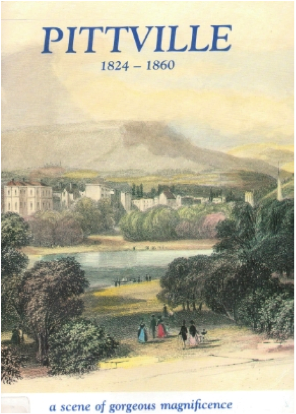
We also publish articles relating to the development of the Pittville estate, brief lives of some of its inhabitants, analyses based on the database, and other factors of social and cultural aspects of Pittville life. Researchers are encouraged to read Dr Steven Blake’s booklet Pittville 1824-1860: a scene of gorgeous magnificence (Cheltenham Art Gallery and Museum: 1988).
The project is run as part of the Friends of Pittville association. But the more people that are involved in it, the more information we will be able to make available. So please contact the project team if you would like to help, or if you discover an error in any of the transcriptions.
- The web site
At present the principal medium for the analysis and display of information is the project web site. It consists of several information pages and two search pages. The contents of the information pages are more or less self-explanatory:
Home – About – Lives – Places – Searches – Map – Contact
Two types of Search (Popular Search and Advanced Search) are explained in more detail at section 6 (Searching the database) below.
- General introduction to the database
Data from the censuses, street directories, etc. is keyed on to the main database. Search requests can be run against the database on the web site. Results appear either as lists, percentages, as diagrams/graphs, or as points on a map of Pittville (from the Cheltenham Old Town Survey of 1855-7).
In order to get the most out of the database, researchers need to understand in outline what sort of information the database contains and how to search it. The following section describes the various fields on the database.
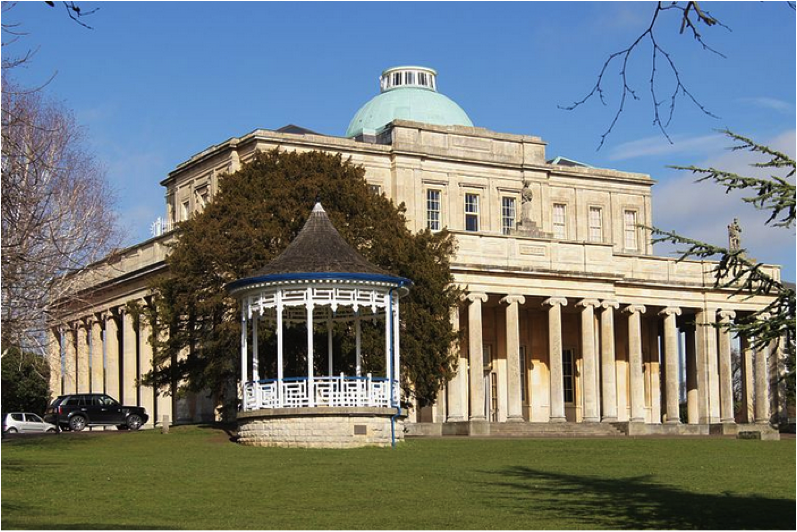
Pittville Pump Room (Wikicommons)

- Fields on the database
Census data
Each of the censuses from 1841 until 1901 presents information in a similar but slightly different format. In general, the data-collection form used by the Victorian census clerks (enumerators) grew steadily more complex over the century.
For the purposes of this project, we have devised a central form which accepts data from all seven of these censuses, so that the information collected from the censuses can be directly compared. In some areas this has involved the merging of minor fields.
More importantly, a number of parallel fields have been included, containing metadata. This is information which does not appear directly on the original census forms but is vital for performing some significant searches. This metadata has mainly been added manually. The most typical metadata data shows actual data in a more standardised form, which is much more suitable for search purposes.
These are the database fields, along with comments when appropriate:
- Year: the year to which the record relates, e.g. the census year 1841, 1851, etc.
- Census reference: the official location reference for a record, e.g. HO107/1973/81/31 (this particular number states the page on which a record from the 1851 census may be found)
- Address1: the current or reference address of a property
- Address2: the historical address of a property
- Displayed name: the name of a person in the form it is found (e.g. with abbreviations) in the original record
- Relation to Head: the relationship a person stands in with reference to the Head of the Household (e/g/ sister, wife, servant) (spellings standardised)
- Marital status
- Gender (M or F)
- Age (as a text field here, allowing for e.g. “7 mo[nths]”)
- Occupation: exactly as stated in the census form
- Place of birth: exactly as stated in the census form, normally containing town and county (or country)
Metadata fields normally facilitate searching. The main metadata fields are:
- Record ID (identifier): a unique number allocated to each record
- Person ID: a unique number allocated to each person on the database
- House ID: a unique number allocated to each property on the database
- First names: respelled in a normalised form
- Surname: respelled in a normalised form
- Age: (as a numerical field)
- Type of occupation: codes and descriptions of occupation types, generally as classified by the organisers of the 1911 census. These allow searches to be made for people from what were regarded as the same general type of work (e.g. the services, domestic servants). The original coding system may be found here (only the highest-level code is employed). When there is no explicit occupation given, Heads of Household in Pittville are normally assumed to have “private means”; their family members are similarly coded as “family”.
- Town of birth (with spelling standardised)
- County of birth (with spelling standardised)
- Country of birth (with spelling standardised)
The database also contains several fields stating the type of occupancy of a house (e.g. inhabited, being built, etc.).
Street directories
 These have a similar coding system, though there are fewer fields of information to record. The source (often the Cheltenham Annuaire) is also recorded.
- Updating the database
At the present stage of the project the database is frequently updated with new data as information on more houses and people becomes available.
- Searching the database
There are two principal ways of searching the database: by using the Popular Search page or the Advanced Search page.
- The Popular Search helps the user to construct a search by offering a series of ready-made search questions, and allowing the user to choose from a number of possible variables. The point of this type of search is to allow the user to form searches easily without having a detailed understanding of the structure of the database. A typical “Popular Search” is:

or

- The Advanced Search
The Advanced Search form allows users to enter their own search requests:
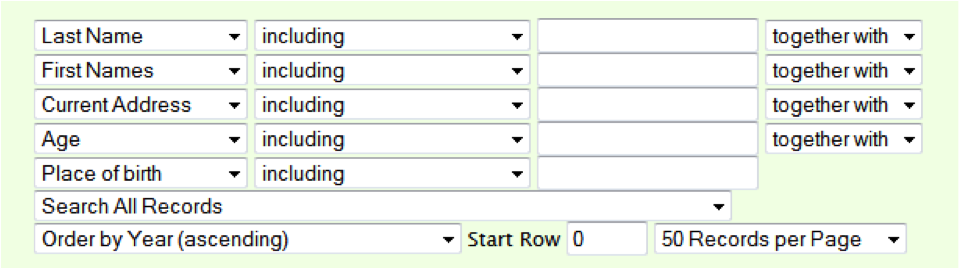
Each left-hand pull-down menu offers the same extensive range of search fields and the linking text “including”, “together with”, etc. expresses the Boolean operators AND, OR, etc. in everyday language. Other options relating to numerical searches include “is less than”, “is greater than”, and so on.
The “Search All Records” menu also offers geographical restrictions to a search, and the final menu item “Order by Year (ascending)” can be clicked to reveal a wide choice of sequencing patterns for lists of results.
The Advanced Search function has been designed to be approachable to inexperienced users, but it also offers a high degree of complex search capability for more experienced researchers.
- Interpreting the results
Results of searches either appear as lists, percentagersd, or as diagrams/graphs.
By default the basic results format is a list, ordered as directed by the search parameters. At the foot of a results set is a new Advanced Search form which can be used to frame a further search.
The topmost rows of the results page shows cumulative data relating from all censuses in respect of the search query:

In this case the search query asked for a listing of all female domestic servants on the database, ordered by census year. This banner describes the results (there are 412 records of people fitting this category). Clicking the graphic icon on the left reveals these percentages:
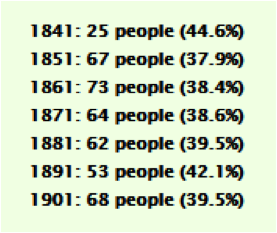
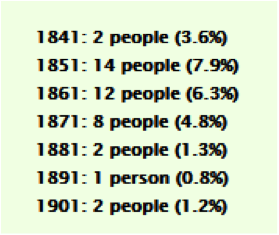
From these numbers it can be seen that the number of female servants in each census year differed quite considerably, but that the overall percentage remained reasonably consistent. An identical search for male servants show svery different results:
Below the topmost banner come the results relating to each year of the census. Here is part of the result set for an Advanced Search for anyone with the surname “Schreiber” who is over 34 years of age:
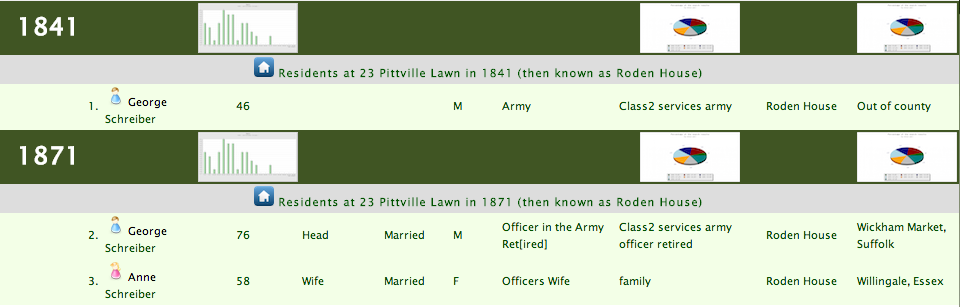
In this search the results are ordered by year. A digest of the census data for each person listed in the results is given. The results page allows various additional functions:
- Clicking on the column head reorders the results as directed (by age, occupation type, etc.)
- Clicking on the person icons
 or
or  next to a name leads to a page showing all records for that person on the database (using the metadata Person ID)>/li>
 - Clicking the sequence number before a record leads to a full record display page.
- Clicking on any of the graphic icons reveals a bar or pie chart of the results (bar chart for age; pie charts of geographical origin). Graphic icons displaying information about the full results set will be found nearer the top of the results page.
- Clicking on almost any element of a person’s record results in a secondary results page including all records from the first result set that share the chosen characteristic.
- Clicking on the house icon
 results in the display of a page cataloguing the inhabitants of that property (using census and street-directory information) over the period covered by the database.
As a result, the Advanced Search is a powerful tool for data analysis from a social-history perspective. The following chart, for example, shows the results of a search for the region of birth of all female servants in the 1861 census (data as at 19 January 2014):
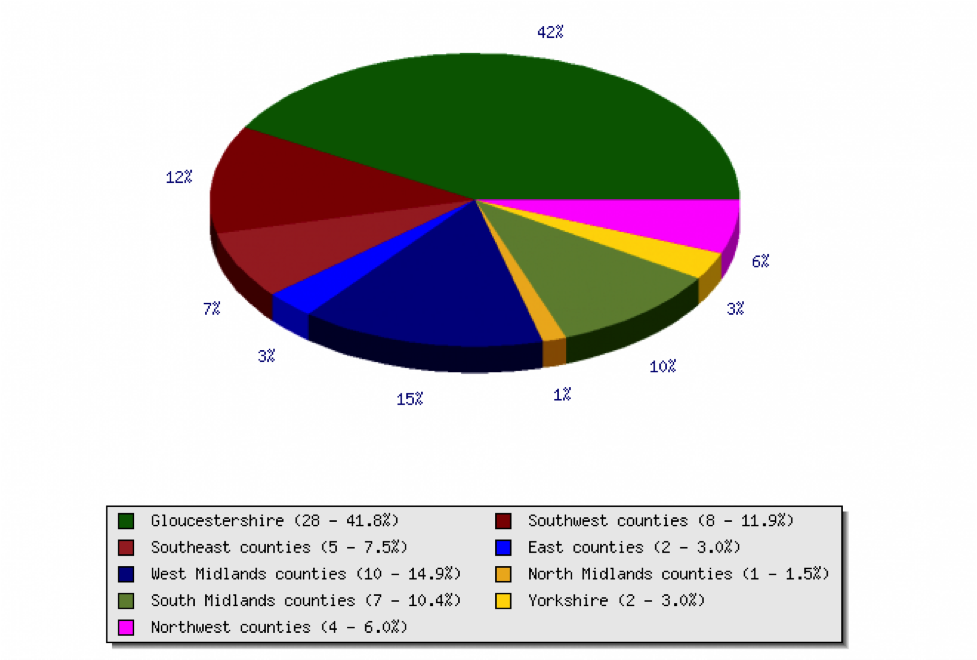
Results are updated dynamically for each search, and are based on the latest information on the database.
- The future
The project and the database are currently in a development stage. If you can any enquiries or suggestions relating to the work please contact the project team here.
This page contains public sector information licensed under the Open Government Licence v2.0